PDF Reader - PDF Editor
- 4.6
- Rating
- 50.00M
- Installs
- Free
- Price
 Analysis by App-foxy
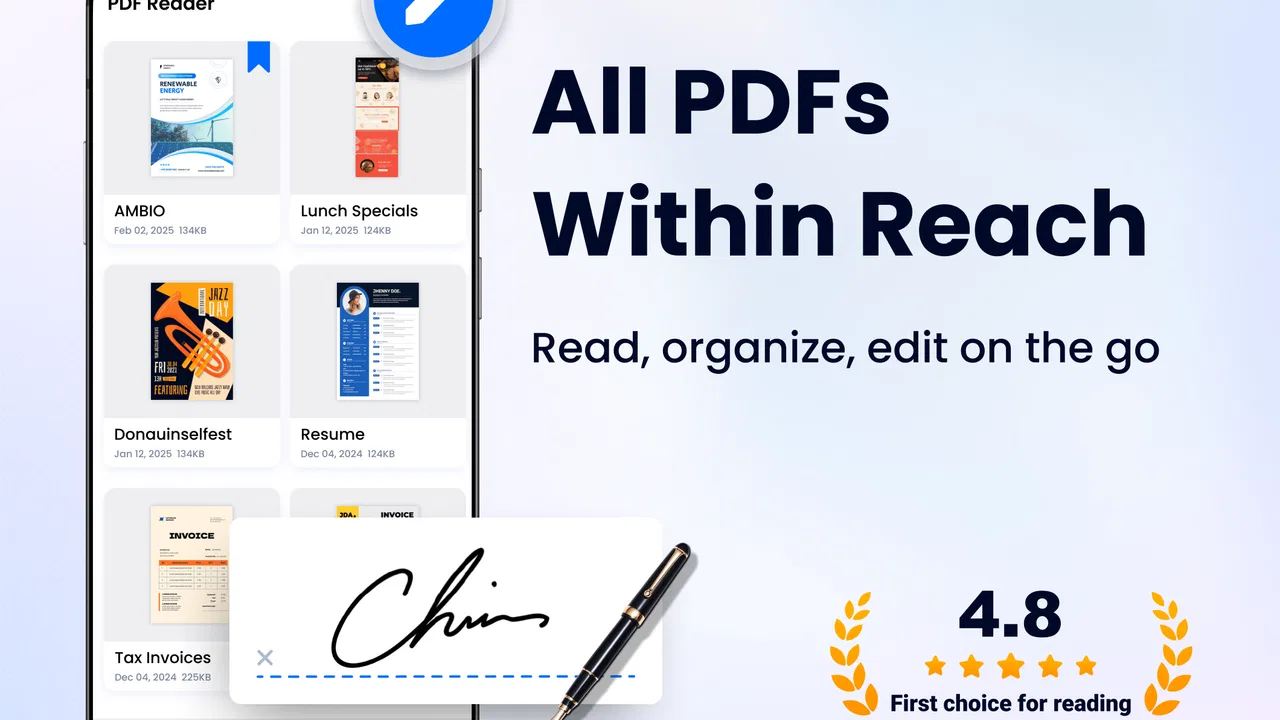
I came away from PDF Reader - PDF Editor with a fairly clear impression: it is a practical Android productivity app for people who want one place to open, read, and manage PDF files without turning their phone into a complicated document workstation. It is not the kind of tool I would choose for heavy office production, but it makes sense as a straightforward reader for everyday documents.
That distinction matters. A PDF app can sound simple, yet the experience depends on how quickly I can find a file, open it without confusion, and return to it later. This app, developed by Simple Design Ltd., focuses on that basic routine. Its store summary presents it as a fast way to read and manage PDF documents, and my overall view is that its strongest value is convenience rather than advanced document engineering.
It is free to install, carries an Everyone age rating, and supports Android devices running Android 6.0 or newer. The current version is 1.6.1. Those details make it accessible to a broad range of phones, including older devices that may not run newer productivity tools comfortably. The app has also built a 4.7 average from around 697 thousand ratings and has passed 50 million installs, which suggests that its uncomplicated approach appeals to a large audience.
You May Also Like

 Blood Strike: 2.5 Anniversary
Blood Strike’s Loadouts Turn Every Drop Into a Tactical Gamble
A close look at Blood Strike’s custom loadouts: how fast access to signature weapons reshapes its battle royale rhythm, rewards preparation, and narrows the gap between fights.

 Pandora - Music & Podcasts
Pandora’s Music Is Easy to Start, but Harder to Recover
Pandora’s strength is its low-effort path from a seed to a station. Its weak spot is how much confidence it asks you to place in connection, setup, and quiet recovery.

 8 Ball Pool
 Is Built on Rivalries, Rematches, and Routine
A close look at the rivalries, rematches, shared routines, and unanswered safety questions that turn a quick pool match into a persistent mobile community.

 Samsung Music
’s Quiet Strength Is Playing What You Already Own
Its reach comes less from spectacle than from dependable access to a personal library. That simplicity is both the app’s strongest retention engine and its ceiling.

 AccuWeather: Weather Radar
AccuWeather Review: A Quick, Clear Forecast for Everyday Decisions
For everyday plans, the best forecast is the one you can understand quickly. AccuWeather makes rain timing, radar, and local conditions easy to act on, with a few trade-offs.

 Hill Climb Racing
Why Hill Climb Racing Still Turns Crashes Into One More Run
A tiny car, a bumpy hill and one more upgrade: Hill Climb Racing keeps resurfacing because its simple chaos makes every near-miss feel personal.
More From Our News Desk
View All News


What using it feels like in daily work
The most useful way to judge this app is to imagine a normal phone-based document task. I receive a PDF in a messaging app, download a form from a website, or save a manual for later. Instead of searching through several unrelated apps, I want a dedicated reader that recognizes the document and gives me a comfortable place to view it. That is where this app fits naturally.
For a commuter, student, renter, freelancer, or anyone who regularly receives documents away from a computer, this kind of arrangement can remove small annoyances. A PDF reader does not need to be exciting. It needs to open files reliably, keep the reading experience understandable, and avoid making simple actions feel like a technical project. I found the app’s appeal strongest in exactly those short, repeated sessions.
The category is important here. This is a productivity app, not a full desktop publishing suite. I would use it to consult a contract, read a timetable, review a course handout, check a product guide, or keep reference documents available on my phone. I would not approach it expecting the same depth as a specialized professional editor used for preparing large business documents.
That makes the app easier to recommend honestly. People often install a PDF tool because they have one immediate need, then discover that reading, organizing, editing, signing, converting, and collaborating are separate levels of complexity. This application is most convincing when the main job is reading and basic document handling. If that is your routine, its focused nature feels like a strength rather than a missing feature.
Finding the right document is half the experience
Opening a PDF is only one part of the problem. On a phone, documents can arrive from email, browsers, cloud storage, messaging services, and file-transfer tools. A reader becomes useful when it helps me move from “I know the file exists somewhere” to “I am reading it now” with as little friction as possible.
That is why I would judge this app less by flashy editing claims and more by how it fits into a personal file routine. I recommend creating a simple habit around it: save important PDFs into clearly named folders, use consistent filenames, and avoid leaving several copies of the same document in different download locations. The app can be a central reading point, but it cannot compensate for a completely disorganized phone.
A small but valuable workflow is to treat the device as a reference library rather than a temporary inbox. For example, I might keep travel documents in one folder, household paperwork in another, and study material somewhere separate. When I need a file during a conversation or appointment, that preparation saves more time than repeatedly downloading the same PDF. This is the sort of practical benefit a short store description cannot explain.
The trade-off is that a mobile reader is still operating within the limits of a phone screen. Long documents can be tiring, especially when the page layout was designed for printing rather than mobile viewing. I would use the app for checking information, reading selected pages, or handling moderate documents. For a long technical report, I would still prefer a tablet or computer if one is available.
Reading comfort matters more than a long feature list
PDFs come in very different forms. Some contain selectable text and simple pages. Others are scanned images, dense tables, unusual fonts, or layouts with tiny notes around the edges. A reader may feel excellent with a clean digital document and much less comfortable with a badly scanned one. I would not blame the app for every poor reading experience, but I would keep that distinction in mind before choosing it as my only document tool.
My practical approach is to test the documents I actually use. Open a work form, a receipt, a study handout, and one longer file. Check whether the text is comfortable at the size you need and whether moving between pages feels natural. A PDF reader should be judged against your own files, not just against a generic promise that all PDFs are supported.
Another useful tip is to avoid judging the app while multitasking with too many documents at once. On a phone, switching between several versions of a file can create confusion, particularly when filenames are similar. I prefer renaming documents before storing them and keeping only the current version easy to find. That turns the app into a cleaner reading tool and reduces the chance of consulting an outdated copy.
For occasional reading, this straightforward approach is enough. I can imagine using it for a downloaded airline document, a school assignment, a warranty guide, or a form that needs checking before I return to a computer. These are modest tasks, but they are common, and a tool that handles them without demanding a larger workflow earns its place.
Where it is stronger than the usual alternatives
The usual alternative is often the first PDF viewer already installed on a phone. That option may be perfectly adequate, but it can leave documents scattered across different apps and storage locations. A dedicated reader gives me a clearer mental model: PDFs belong in one place, and this is the app I open when I need to read one.
Another alternative is a large office or cloud-storage application. Those suites can be useful when I need collaboration, shared folders, document creation, or integration with other work tools. Their weakness is that they may feel excessive for someone who only wants to read a file. A focused reader such as this one can be easier to understand because it does not ask a casual reader to learn an entire office ecosystem.
There is also a difference between reading and editing. Many people use “PDF editor” broadly, but their needs vary. If I only need to view documents and keep them manageable on my phone, a lightweight reader is a sensible choice. If I need dependable form filling, detailed annotations, signature workflows, page rearrangement, or professional document preparation, I would compare dedicated tools carefully before relying on this one for important work.
That is not a criticism of its basic purpose. It is a reminder to match the app to the job. The best PDF reader for a student checking notes may not be the best document system for an accountant, legal professional, or office administrator. In my view, the app earns a recommendation when simplicity is the priority, not when maximum control is the priority.
The meaningful limitations I would consider first
The main limitation is the gap between a convenient mobile reader and a complete document workspace. The name includes PDF Editor, which may lead some users to expect a broad set of editing capabilities. I would be cautious about making that assumption. For serious document changes, I would first confirm that the exact tools I need are available and suitable for the document involved.
This matters especially with forms and official paperwork. A file can open perfectly while still being difficult to modify correctly. Interactive fields, scanned pages, embedded elements, and unusual formatting can all change what is possible. I would never wait until the submission deadline to discover that a document requires a more specialized editor. My safer workflow would be to test a copy early and keep the original untouched.
The app also includes in-app purchases ranging from $9.99 to $49.99 per item. Since the basic app is free, that gives users a low-risk way to try the reading experience before deciding whether paid options are worthwhile. At the same time, I would look carefully at what a paid item unlocks before purchasing, particularly if I only need occasional viewing rather than repeated document work.
That pricing structure makes the app less attractive to someone searching for a completely free, advanced editing setup. It may still be reasonable for a person who uses PDF tools often, but occasional users should avoid paying simply because an extra button appears useful. I would first establish whether the free experience covers my real routine.
Another limitation is the natural compromise of using a phone. Even a well-designed reader cannot make a small display ideal for every PDF. Tables may require repeated zooming, pages with two columns can be awkward, and detailed forms may be easier to inspect on a larger screen. I would call this a device limitation more than an app flaw, but it affects the buying decision all the same.
Who should install it, and who should look elsewhere
I think this app is a good fit for Android users who regularly open PDFs but do not want a large office suite. It suits people who need a dependable place for manuals, receipts, school material, travel paperwork, and downloaded documents. It is also a reasonable option for users with older Android phones because the minimum operating-system requirement reaches back to Android 6.0.
It may be particularly useful for someone who has accumulated PDFs across several apps and wants a more deliberate reading habit. I would install it, test a handful of personal documents, and then decide whether it is comfortable enough to become the default reader. That trial is more informative than relying on the app’s broad category label.
I would be more hesitant to recommend it as the only tool for professional document production. People who work with complex contracts, detailed annotations, signatures, conversions, or collaborative editing should compare it with specialized software built around those tasks. A full office suite may be better when documents are part of a shared business process rather than personal reference material.
It is also not the best choice for someone who mainly reads long books or research papers. A dedicated ebook or academic reading app may provide a better experience for extended sessions, especially if reading position, highlights, notes, and library organization are central to the workflow. This app makes more sense for practical PDFs than for turning a phone into a serious digital library.
Families may appreciate the Everyone rating, while still needing to make sensible choices about the documents stored on a shared device. The age rating describes general suitability, not whether every document a person opens is appropriate. I would also keep sensitive paperwork organized carefully and avoid treating any general-purpose reader as a replacement for responsible file management.
My verdict after weighing convenience against control
My final judgment is positive but specific. PDF Reader - PDF Editor is best understood as an accessible PDF reading and management tool, not an automatic replacement for every document app. Its broad availability, free starting point, older Android support, and large user base make it easy to try. The 4.7 average is consistent with the impression of a product that meets a common need for many people.
I would recommend it to a friend who says, “I just need to open and keep track of PDFs on my Android phone.” That is the clearest use case, and the application feels appropriately focused there. I would tell the same friend to test their most important document types, organize files by purpose, and review any paid options before spending money.
I would not recommend installing it with the expectation that a phone-based reader will replace a desktop document workflow. The more demanding the task becomes, the more important specialized editing, larger screens, and established office tools become. Choosing another option in that situation is not overkill; it is simply a better match for the work.
For everyday PDF access, though, this app has a sensible place. It keeps the decision simple: if your priority is opening documents quickly and managing them without a complicated productivity suite, it is worth trying. If your priority is deep editing and professional control, treat it as a reader to evaluate rather than a complete answer.
FAQs for PDF Reader - PDF Editor
01What features does PDF Reader - PDF Editor offer?
PDF Reader - PDF Editor provides a comprehensive suite of tools for viewing, annotating, and editing PDF documents. Users can highlight text, add comments, and fill out forms. Additionally, the app supports adding signatures, merging files, and converting PDFs to different formats. Its user-friendly interface makes document management effortless.
02Is PDF Reader - PDF Editor free to use?
PDF Reader - PDF Editor offers a free version with essential features such as basic viewing and annotating. However, advanced tools, including editing and file conversion, might require an in-app purchase or subscription. This tiered pricing model allows users to choose the functionality that best fits their needs.
03How does PDF Reader - PDF Editor handle document security?
The app ensures document security by allowing users to set passwords and permissions on PDFs. This helps protect sensitive information from unauthorized access. Additionally, the app supports encrypted file storage, ensuring that your documents remain secure even if your device is lost or stolen.
04Can I use PDF Reader - PDF Editor offline?
Yes, PDF Reader - PDF Editor can be used offline. All basic features, such as viewing and annotating PDFs, are accessible without an internet connection. This makes it convenient for users who need to work on documents while traveling or in areas with limited connectivity.
05What file formats are supported by PDF Reader - PDF Editor?
PDF Reader - PDF Editor primarily supports PDF files, but it also allows conversion to and from various formats such as Word, Excel, and image files. This flexibility ensures that users can easily integrate the app into their existing workflows and handle a variety of document types efficiently.
Pros
- Intuitive user interface for easy navigation.
- Supports multiple file formats beyond PDFs.
- Offers cloud integration for file access.
- Annotation tools are comprehensive and useful.
- Fast rendering of large PDF files.
Cons
- Ads can be intrusive in the free version.
- Limited features in the free tier.
- Requires internet for some functionalities.
- Occasional lag on older devices.
- Some advanced tools need a premium subscription.

PDF Reader - PDF Editor
Gallery